Desktop billing software for Windows that keeps billing when the internet does not
Stock2Track Offline installs on your shop’s Windows 10 or 11 computer. Billing, stock, purchases and accounts run on your own PC, with no internet needed at the counter and no monthly fee. One payment of ₹25,000, yours for life.
Used by 2,000+ businesses across India. Unlimited users, products and invoices.
The counter cannot wait for the internet.
Online software suits many businesses. But a lot of shop owners tell us the same things when they ask for billing that runs on their own computer.
- The internet drops in the evening rush, and a billing screen that lives in the browser stops with it.
- A monthly subscription keeps adding up, year after year, for a shop that only wants to bill and keep stock.
- The owner wants the shop’s data on the shop’s own computer.
- Two or three counters need to bill at the same time from the same stock.
- Staff are fast on the keyboard and do not want to wait for a web page to load.
What Stock2Track does on your Windows computer
Bills with or without a connection
The whole software and all your data sit on your own PC. The internet can go, and the counter keeps billing, printing and updating stock.
Several counters, one stock
Connect the Windows computers in your shop over the local network. Every counter bills from the same stock, and the owner’s computer sees every sale.
Keyboard and barcode billing
Scan the barcode or type the first letters of the item. Keyboard shortcuts, park-and-resume bills, and cash, card and UPI on the same bill.
GST, non-GST or composition bills
GST invoices with HSN and tax breakup, GSTR-1 and GSTR-3B data, e-invoices and e-way bills for registered shops. Plain bills for unregistered and composition shops.
Stock and supplier dues that add up
Every sale, purchase and return moves stock. Set reorder levels, enter supplier bills once, and see who you owe and who owes you.
Your data, backed up your way
Copy your data to a pen drive or a cloud drive such as Google Drive. If the computer ever fails, our team restores it on the new one.
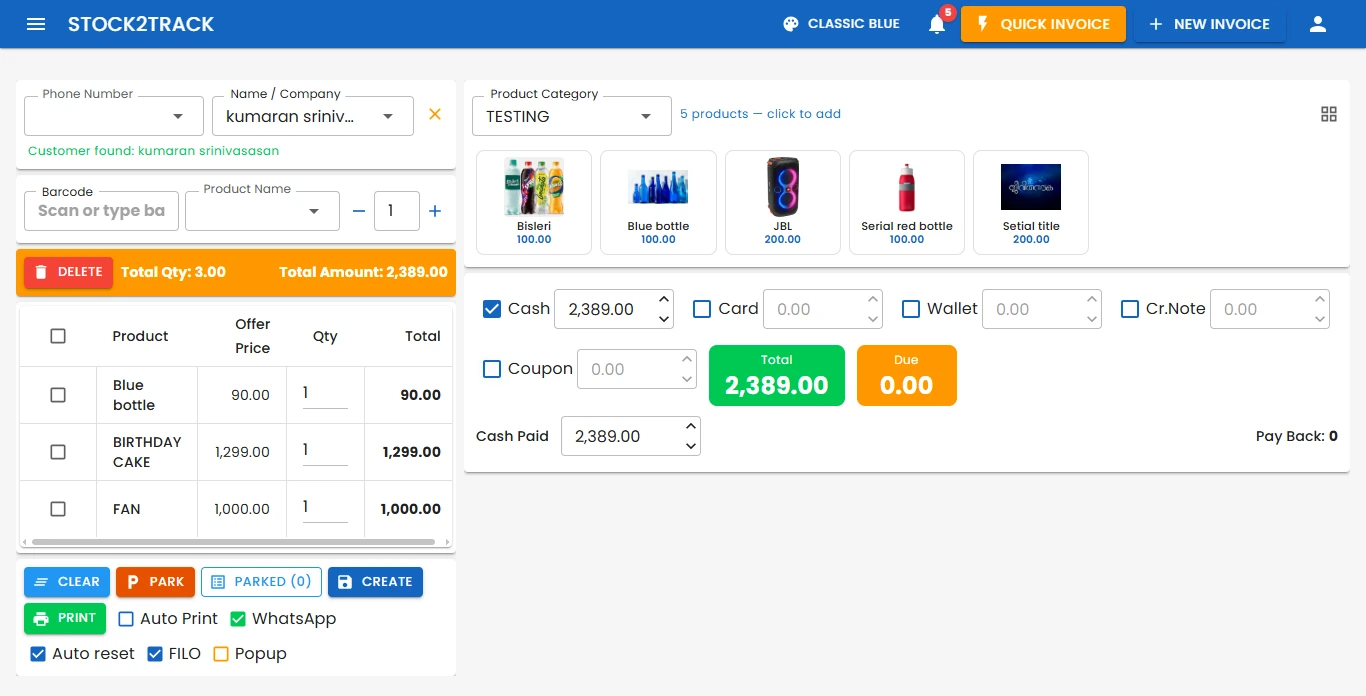
The billing screen on Windows
This is the real Stock2Track counter screen. Find the customer by phone number, scan or pick the items, take the payment in any mix of cash, card and wallet, and print or send the bill.
- Barcode, item name or product tiles, whichever is fastest for your counter.
- Park a bill and serve the next customer while someone fetches one more item.
- Print automatically, or send the bill on WhatsApp.
- Stock, customer balance and the day’s cash update with every bill.
Which edition is right for you?
Same Stock2Track, two ways to run it. We will tell you honestly which one fits during the demo.
- You run one shop and want billing that never depends on the internet.
- You prefer to pay once, not every year.
- You want the data on your own computer.
- You do not need the shop on your phone. The desktop edition has no phone app.
- You want sales, stock and dues on your phone, on Android or iOS.
- You have more than one branch, up to five locations on one plan.
- You sell online as well as at the counter.
- You are fine with a yearly plan in return for access from anywhere.
Still deciding? Read offline or cloud billing software: how to choose, or see how the offline edition handles power and internet cuts.
Runs on the computer you probably already have.
No special hardware and nothing proprietary. We install it, import your items and train your staff.
- Windows 10 or Windows 11.
- At least 4 GB of RAM. 8 GB is better for a busy counter.
- Works with standard barcode scanners, thermal and label printers, weighing scales and pole displays.
- Your existing item list imported from Excel.
- A standard shop is usually billing within about an hour of installation.
- Available in English, Hindi, Telugu, Tamil and Kannada.
Pay once. Bill for life.
Offline (desktop)
One shop, any number of counters on the shop network.Cloud
Up to five locations, phone apps and selling online.Prices exclude GST. Need something this page does not cover? Our own engineers build it for you — see custom development.
Questions about the desktop edition
Does it really work without the internet?
Yes. The software and your data sit on your own Windows computer, so billing, stock, purchases and reports all work with no connection. You only need the internet for things that leave the shop, such as sending a bill on WhatsApp or generating an e-invoice or e-way bill.
Can I see my sales on my phone with the desktop edition?
No. The Offline edition runs only on the shop’s computers and does not include a phone app. If you want sales, stock and dues on your phone from anywhere, choose the Cloud edition, which comes with Android and iOS apps.
What happens if the computer breaks down?
Keep a copy of your data on a pen drive or a cloud drive such as Google Drive. If the computer fails, our support team installs Stock2Track on the new computer and restores your data from that copy.
Which Windows version and computer do I need?
Windows 10 or Windows 11. The computer needs at least 4 GB of RAM, and 8 GB is better for a busy counter. It works with standard barcode scanners, thermal and label printers and weighing scales.
Can more than one counter bill at the same time?
Yes. Several Windows computers in the same shop connect over the shop’s local network and bill from the same stock, with unlimited users, products and invoices.
What does it cost, and is there a monthly fee?
No monthly fee. The Offline licence is ₹25,000 one time, excluding GST, for one shop. Support is free for the first year and ₹1,000 a year after that, if you want it. A standard shop is usually set up and billing within about an hour, and we can import your item list from Excel.
See it with your own items and bills.
Tell us what you sell and we will set up a 20-minute walkthrough using your kind of items and your kind of bills. No slides, just the product.