
Direct thermal or thermal transfer
One question decides it: how long must the label survive, and what will it touch? Plus the two costs nobody mentions when they say direct thermal is cheaper.
Almost every shop that starts barcoding asks the same question in the same week: which barcode printer should I buy? And almost every answer they get is a specification sheet.
The decision is simpler than the specification sheet makes it look. One question settles most of it:
How long does this label have to survive, and what is it going to touch?
Everything else follows from that.
What is actually different inside the two machines
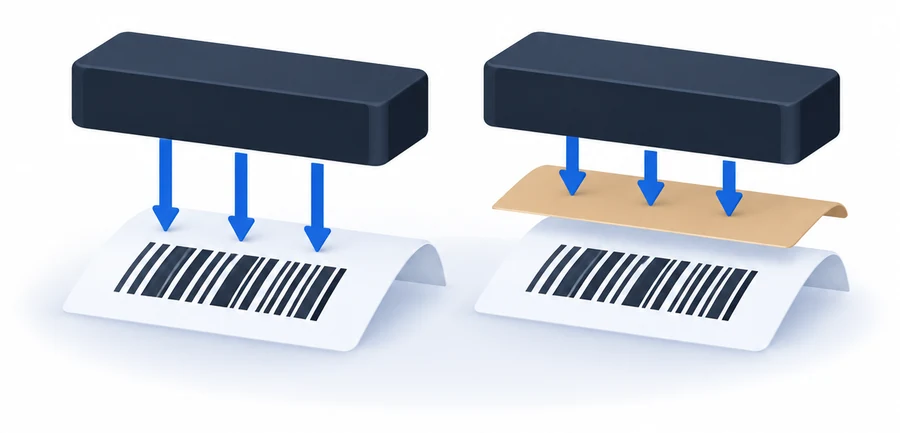
Both types work by heating a row of tiny elements in the printhead. What the heat lands on is the whole difference.
Direct thermal prints onto paper that has been coated to darken where it is heated. There is no ink and no ribbon. The heat touches the label and the label goes black in the right places.
Thermal transfer puts a ribbon between the printhead and the label. The heat melts a coating off the ribbon and onto the label surface. The mark on the label is the ribbon's coating, not a change in the paper.
That single difference produces everything below.
Direct thermal: right for anything short-lived

If the label only has to last weeks, direct thermal is usually the sensible choice, and that covers a great deal of Indian retail. Loose goods repacked and sold the same month. Grocery. Sweets. Shelf and price labels that get replaced whenever the rate changes. A carton going out tomorrow.
The rule of thumb across the industry is that direct thermal stays reliably scannable for about six months. That is the ceiling, not the target. It comes down fast with heat, sunlight, friction, water and solvents — and the first two matter more in Hyderabad in May than they do in the datasheet.
The failure is also worth understanding, because it is not dramatic. A direct thermal label does not vanish. It goes grey, and the bars lose their edges, and one day the scanner stops reading it first time. If the goods have long since sold, nobody notices. If the goods are still on the shelf, somebody is now typing codes by hand.
The two costs nobody mentions
Here is where the usual advice gets it wrong, and it is worth being precise because the intuition is so strong. No ribbon must mean cheaper. It does not follow.
The media costs more. Direct thermal paper is a coated, engineered product, and it carries a premium over plain label stock. SATO, one of the larger label printer manufacturers, puts that premium at 5 to 50 per cent over the cost of thermal transfer labels and the ribbon combined. The ribbon you did not buy has not necessarily saved you anything; you may well have paid more for the roll than the ribbon would have cost.
The printhead wears faster. This is the one almost nobody raises. In thermal transfer the ribbon sits between the printhead and the label, so the printhead is never touching the paper, the dust on it or the adhesive at the edges. It acts as a buffer. In direct thermal there is nothing in between. Industry guidance is that a direct thermal printhead may last only a quarter to a half as long as one in an equivalent thermal transfer printer, and a printhead is not a cheap part.
None of this means direct thermal is the wrong choice. It means the saving is real in two places — the printer costs less to buy, and nobody has to stop and change a ribbon — and much less real in the third place everybody assumes it is.
Thermal transfer: right for anything that has to last
If the label has to survive months on a shelf, a season in a godown, a journey, sunlight, handling, cold or cleaning chemicals, use thermal transfer. Garment tags. Anything stored before it sells. Asset tags. Cartons that will sit in a warehouse. Anything with a serial number that has to be readable in three years when somebody brings the item back.
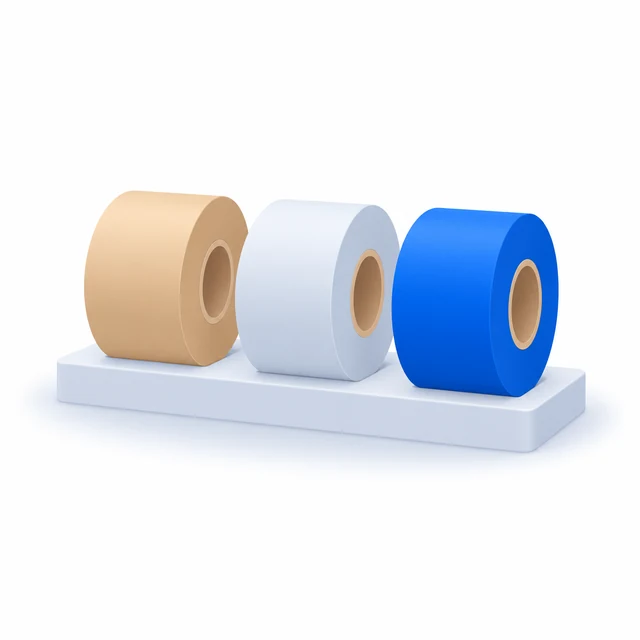
Then there is a second choice that shops are rarely told about, which is the ribbon itself. There are three kinds and they are not interchangeable:
| Ribbon | Prints on | Stands up to |
|---|---|---|
| Wax | Paper labels | Indoor use, light handling. Cheapest, softest mark |
| Wax-resin | Paper and coated stock | Scratching, abrasion, moisture, sunlight, moderate heat |
| Resin | Synthetic labels only | Chemicals, UV, water, extreme temperature, outdoors |
For most retail barcoding, wax-resin on a coated paper label is the sensible middle. Wax is cheaper and fine for something indoors that gets handled twice. Resin is for labels that will genuinely be attacked — chemicals, weather, a freezer — and it needs a synthetic label rather than paper to bond to, so it is a different purchase, not just a different ribbon.
There is also a middle option on the direct thermal side that gets skipped: topcoated direct thermal labels carry a protective layer that resists scratching, moisture and light better than plain ones. They cost more. If direct thermal is nearly right for you and the only problem is handling, that is worth asking about before you move to a ribbon printer.
Durability and sharpness are two different things

This is the mistake worth catching, because it sends people to the wrong printer.
The ribbon determines how well the mark survives. It does not determine how sharp the mark is. Sharpness comes from resolution, and resolution is measured in dots per inch, and it is a separate specification that direct thermal and thermal transfer printers both have.
The arithmetic is simple: one dot measures one inch divided by the dpi. At 203 dpi a dot is about five thousandths of an inch; at 300 dpi it is about three and a third. So a 300 dpi printer can hold a code at roughly half the physical size and still have the scanner read it reliably.
For ordinary retail labels, 203 dpi is enough and always has been. You want 300 dpi when:
- the label is physically small — jewellery tags, pharmacy strips, small electronics
- you are printing 2D codes such as QR or DataMatrix into a tight space
- there is text below about six points, which starts looking ragged at 203 dpi
If your tags are small, a 300 dpi direct thermal printer will give you a sharper barcode than a 203 dpi thermal transfer one. Sharpness and lifespan are bought separately.
Can it print receipts too?
This gets offered as a reason to choose direct thermal, and it is true of some printers rather than all of them. Receipts are direct thermal, so the printing method matches. The question is whether that particular model handles a continuous roll as well as die-cut labels, and whether it will switch between the two without a fight.
Some label printers are built as hybrids and do this properly. Many are not. And it does not work in the other direction at all — an ordinary receipt printer cannot print labels, because it has no sensor to find the gap between one label and the next.
So it is a real advantage where it exists, and a model-by-model question rather than a reason to pick a category. Ask about the specific model before you buy on that basis.
The short version
- Sold or replaced within weeks, kept indoors? Direct thermal. Cheaper printer, no ribbons to change.
- Has to survive months, handling, heat, a godown or a journey? Thermal transfer, and ask for wax-resin unless there is a reason to go further.
- Nearly direct thermal, but the labels get handled? Ask about topcoated direct thermal before moving up.
- Small tags or 2D codes? Look at dpi, not at the printing method. 300 dpi.
- Want receipts from the same machine? Possible, but check that model specifically.
Stock2Track prints to both through the standard Windows driver, so this is a decision about your goods rather than about the software. If you tell us what you sell and how long it sits before it goes, we will tell you which one you need — including when the cheaper one is the right answer.
Where the figures come from: the media cost premium and the printhead life comparison are from SATO's published guidance on thermal printing; the six-month figure for direct thermal legibility and the ribbon durability comparisons are consistent across manufacturer documentation from Brother, TSC and others. Your own results will vary with climate, handling and label quality — Hyderabad in summer is harder on a label than a specification sheet assumes.